
THE SIXPLANETS BLOG
Choose a front, back or left-chest T-shirt print
Compare front, back and left-chest placements for custom T-shirts. Choose by readability, garment fit and how the shirt will be worn.
By sixplanets · Published About 3 min read
In this guide
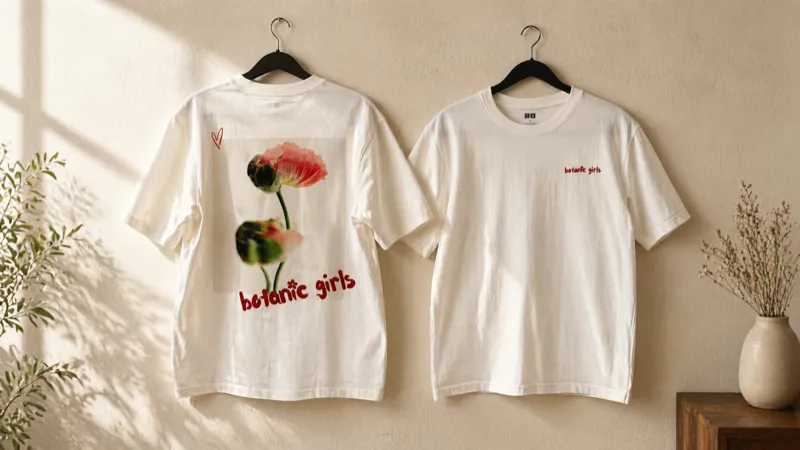
Print placement changes how people encounter a design. A large front graphic can be the main feature of a shirt. A small chest mark can identify a team without taking over the garment. A back print can carry the detail that would crowd a smaller front logo. Choose the purpose of the shirt before choosing its locations.
Use the front for the main message
A front print works well when the artwork needs to be seen during a conversation, in a group photo or from across an event space. A band illustration, a short phrase or a prominent event identity can all work here. A long paragraph usually needs simplifying before it becomes a readable shirt design.
Start with one visual priority. If the artwork contains a title, illustration and date, decide which should be noticed first. View the design at its intended size, then step back. The smallest text should not have to carry the essential message.
Keep a left-chest mark simple
A chest mark has less space than a full-front composition. It suits an uncomplicated logo, short name or compact badge. Fine detail that looks attractive on a laptop may become difficult to distinguish when reduced.
Use the wearer's left when discussing placement with your team or the studio. The viewer's left is the opposite side. Check the labeled location in the editor and the final proof, particularly if the design has directional artwork or needs to coordinate with another garment.
Give the back a separate job
The back can hold a larger illustration, event information or a second part of a design. Treat it as a deliberate composition rather than a place to copy everything from the front. A small front logo and a back graphic can share a typeface or color without having identical layouts.
Think about the use of the shirt. A back design can be obscured by a jacket or backpack. Important contact information should not depend on an area that will regularly be covered. On a hoodie, consider the hood as well as the torso.
Compare the placements on the actual blank
The studio offers locations supported by the selected catalog garment. Not every item supports every placement. Bags, caps, sleeveless tops and other garment shapes need their own print areas, so a location available on one T-shirt should not be assumed available on another item.
Use the actual garment photographs where a view is available. Missing or uncalibrated views are labeled references, and the preview remains an approximation. Leave enough room for collars, seams and garment features; use the proof to confirm final scale and alignment.
Choose locations by how the shirt will be used
At sixplanets, the price shown for a custom shirt covers the print locations you choose, so placement is a design decision. Compare the single-location design with a version that adds another location in the editor, and keep the one that serves the shirt best. The authoritative total, including shipping and any tax or discount, appears in checkout.
If the second location does not improve the shirt's purpose, simplifying the design may be the better choice. You can order one piece with no minimum; a team does not need several locations to look consistent.
Review every location before submitting
- Confirm front, back and wearer-side labels.
- Check that each location contains its intended artwork.
- Remove test layers and unused locations.
- Check the total in the editor after changing locations.
- Review the studio proof before approving production.
Compare T-shirts to find a blank, or ask the studio about different names, numbers or artwork across a team order.